PSD Photo Mask Collage 1: A Practical Guide to Effortless Memory Keeping
If you have ever stared at a blank scrapbook page or a digital layout and felt paralyzed by the need to make it look "professional," you are not alone. Most of us want our photos to tell a story, but arranging them in a way that feels artistic rather than cluttered can be a significant hurdle. This is where PSD Photo Mask Collage 1 steps in as a practical solution. It is not just another template; it is a layered photo mask collage template specifically designed for 12 x 12 scrapbook pages, school memory pages, family layouts, yearbooks, classroom projects, albums, and printable keepsakes.
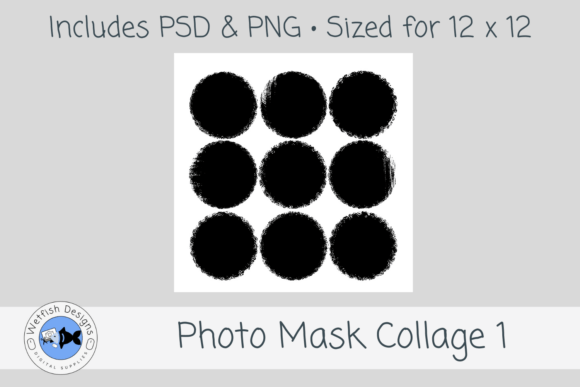
The core appeal of this tool lies in its simplicity and aesthetic. It features a distressed 9-circle photo mask arrangement with a hand-painted, grungy edge style. Instead of fighting with complex software tools to cut out shapes, you simply drop your images into the provided layers. The result is a full-page photo collage with soft circular photo spots that instantly elevates the visual quality of your work. Whether you are documenting back-to-school moments, childhood memories, sports highlights, family vacations, senior year milestones, or just everyday life, this template provides the structure you need without the stress.
Why the Distressed Circular Style Matters
In the world of digital design and scrapbooking, trends come and go, but certain styles remain timeless because they add texture and depth. The distressed circular mask style used in PSD Photo Mask Collage 1 taps into the popular "grunge" and "vintage" aesthetics that many creators love. Unlike sharp, geometric squares or perfect circles, the hand-painted edges give the collage a tactile, organic feel. It looks less like a computer-generated grid and more like a physical craft project.
This stylistic choice is particularly effective for emotional content. When you are preserving memories—whether it’s your child’s first day of kindergarten or a weekend trip to the beach—you often want the presentation to feel warm and nostalgic. The grungy edges soften the transition between photos, allowing the eye to move naturally from one image to the next. For educators and parents creating classroom projects or family albums, this subtle artistic touch makes the final product feel curated and thoughtful, rather than rushed.
Real-World Applications Across Different Lifestyles
One of the strongest arguments for using PSD Photo Mask Collage 1 is its versatility. While it is marketed toward scrapbookers, its utility extends far beyond traditional paper crafting. Let’s look at how different users can apply this resource in their daily lives.
For Parents and Family Memory Keepers
Parents are often the primary consumers of memory-keeping products. Between birthday parties, holiday gatherings, and daily routines, there is no shortage of photos to organize. A 12 x 12 layout is the standard size for many digital scrapbooking apps and print-at-home services. With nine distinct photo spots, this template allows you to capture a narrative arc. You might use the larger central circle for a group shot, while the surrounding eight circles highlight individual expressions or candid details. It transforms a random dump of smartphone photos into a cohesive story spread.
For Educators and School Projects
Schools frequently require students to create memory books, end-of-year reflections, or portfolio pieces. Teachers know that technical skill varies wildly among students. Providing a pre-designed mask like PSD Photo Mask Collage 1 levels the playing field. It allows students to focus on selecting meaningful images rather than worrying about alignment or spacing. For high school seniors, this specific template works beautifully for yearbook-style layouts or graduation announcements, offering a polished look that honors their achievements without requiring advanced graphic design skills.
For Digital Designers and Freelancers
If you are a freelance designer or a blogger, time is money. Clients often request social media graphics, blog headers, or digital invitations that feature multiple images. Downloading a 300 dpi, layered PSD file means you can quickly assemble a professional-looking composite image. The PNG photo mask file included in the set adds even more flexibility, allowing you to use the mask effect in other software if needed. This efficiency lets you take on more projects or spend more time refining the creative direction rather than building basic structures from scratch.
For Small Business Owners and Marketers
Small businesses, particularly those in the handmade, craft, or lifestyle sectors, rely heavily on visual storytelling. If you sell custom journals, plan your own events, or run a photography side-hustle, you need consistent branding. Using a recognizable style, such as the distressed circular motif, can become part of your brand identity. You can use these collages for Instagram carousels, Pinterest pins, or email newsletter headers. The 12 x 12 aspect ratio scales well for various digital formats, making it a multi-purpose asset for your marketing toolkit.
Technical Benefits That Translate to Better Results
It is easy to get bogged down in technical specifications, but understanding what is inside the download helps you appreciate the value. PSD Photo Mask Collage 1 is designed at 300 dpi, which is the industry standard for high-quality printing. If you plan to print your layouts at home or send them to a professional printer, this resolution ensures that your photos remain crisp and clear, avoiding pixelation or blurriness.
The fact that it is a layered PSD file is crucial. In Adobe Photoshop (and compatible software), layers allow you to edit non-destructively. You can adjust the position of each photo independently, change the background color behind the masks, or add text overlays without messing up the underlying structure. Additionally, the inclusion of a PNG photo mask file provides an extra layer of utility. PNG files support transparency, meaning you can easily drag and drop this mask over any image in almost any editing program, not just Photoshop. This cross-platform compatibility makes it accessible even if you don’t have a full Creative Cloud subscription.
What to Consider Before You Start
While PSD Photo Mask Collage 1 is a powerful tool, success depends on how you use it. Here are a few practical tips to keep in mind:
- Photo Selection is Key: The template provides the frame, but your photos provide the soul. Choose images that have similar lighting or color tones if you want a harmonious look. Conversely, contrasting colors can create a vibrant, energetic feel. Since there are nine spots, try to include a mix of wide shots, close-ups, and detail shots to keep the viewer engaged.
- Resolution Check: Even though the template is 300 dpi, your source images matter. Ensure your photos are high-resolution enough to fill the 12 x 12 space without looking blocky. Blurry phone snapshots may lose quality when blown up to this size.
- Customization Opportunities: Don’t feel bound by the default look. Because it is a layered file, you can change the background texture, add embellishments like ribbons or stickers, or alter the opacity of the grunge edges. Make it yours.
- Software Compatibility: Verify that your editing software supports PSD files with smart objects or clipping masks. Most modern versions of Photoshop, GIMP, and Affinity Photo handle these well, but older or simpler mobile apps might struggle with the layer complexity.
Final Thoughts on Streamlining Your Creativity
The goal of any design tool should be to remove friction from the creative process. PSD Photo Mask Collage 1 achieves this by providing a ready-made, aesthetically pleasing structure that handles the difficult parts of composition for you. Whether you are a hobbyist looking to preserve precious family moments or a professional aiming to deliver client work faster, this template offers a reliable foundation.
It bridges the gap between amateur photo dumping and professional design. By focusing on the emotional content of your images rather than the mechanics of layout, you can create keepsakes that truly resonate. From classroom projects to commercial marketing materials, the distressed circular style adds a touch of artisanal charm that stands out in a sea of generic templates. If you are ready to turn your photo library into organized, beautiful narratives, this 12 x 12 layered file is a worthy addition to your digital craft kit.